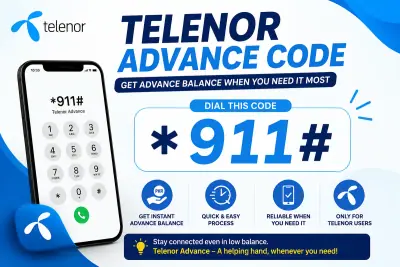
Telenor Advance Code: Get Instant Balance When You Need It Most
Running out of balance at the worst possible moment happens to everyone. You need to make one urgent call, send one important message, or check one email, and your Telenor SIM shows zero credit. The Telenor Advance Code fixes this problem in seconds, without a wallet, a shop, or an internet connection.
This guide walks you through the exact steps to get emergency balance on your Telenor number today. You will learn the code, the charges, the eligibility rules, and how to check your balance once the loan lands. By the end, you will never feel stuck with an empty SIM again.
What Is the Telenor Advance Code
The Telenor Advance Code is a simple USSD shortcut that gives prepaid users emergency credit when their balance runs dry. Dial the code, confirm the request, and the loan appears on your account almost instantly. No app download, no signup form, and no waiting period stand between you and your credit.
Telenor built this feature for real emergencies. Maybe you are traveling and forgot to top up. Maybe payday is still a few days away. Whatever the reason, the service keeps you connected without forcing an immediate recharge.
How to Dial the Code and Get Your Loan
Getting your loan takes less than a minute. Follow these steps on your Telenor prepaid number:
Open your phone dialer.
Dial *0# and press call.
Read the confirmation message on your screen.
Confirm the request when prompted.
Check your balance immediately after.
Once you confirm, Telenor credits your account with the loan amount right away. Most users see the balance appear within a few seconds of dialing.
How Much Balance Do You Receive
Telenor typically loads Rs. 15 as advance balance through this service. Occasionally the network runs promotional offers that raise this amount for select users, so always check your on-screen message for the exact figure before you confirm.
Telenor Advance Balance Code Eligibility
Not every SIM qualifies automatically. Telenor checks a few conditions before it approves your request through the telenor advance balance code system:
Your SIM must run on a prepaid connection. Postpaid numbers do not qualify.
Your number must stay active and recharge regularly, since dormant SIMs often lose eligibility.
You must clear any previous advance loan before you request a new one.
Your account must show a recent history of usage or recharge.
If your request fails, an unpaid previous loan or a recently inactive SIM is usually the reason. Recharge your account and try again after settling any outstanding balance.
Charges and Repayment Explained
Nothing in life stays completely free, and this service carries a small fee. Telenor charges roughly Rs. 3.5 plus tax for each advance loan. The network deducts this fee, along with the loan amount, automatically from your very next recharge.
You do not need to remember to repay anything manually. The system handles deduction the moment you top up your SIM again. This automatic process makes the Telenor Advance Code far simpler than a traditional loan, since there are no due dates or penalty charges to track.
How to Check Your Balance After Requesting
Once your advance balance lands, confirm the amount before you start making calls or sending messages. Dial 444# to view your current balance instantly. If you want to check your remaining internet data instead, dial 999# and the screen will show your leftover MBs.
Checking your balance right after the loan lands also confirms the request went through successfully. This small step saves you from any confusion later.
How to Unsubscribe From the Service
If you no longer want advance balance offers popping up on your number, opting out takes just one text message. Send UNSUB to 345 and Telenor removes your number from the advance balance list. You can always rejoin later by simply dialing the code again whenever you need it.
Other Ways to Get Emergency Balance
Dialing the short code is not your only option. Telenor also offers advance balance through the My Telenor app and through Easypaisa, giving you flexibility beyond a basic phone call. These channels work well if you already manage your SIM through the app and prefer a visual confirmation over a USSD popup.
Final Thoughts
Nobody plans for a dead balance right before an important call. This service exists exactly for that moment, turning a stressful situation into a quick, three-second fix. Keep the code saved in your notes, remember the small service charge, and you will never lose connection when it matters most.
Frequently Asked Questions
What is the Telenor Advance Code and how does it work?
The Telenor Advance Code is *0#, a USSD shortcut that gives prepaid users instant emergency balance. Dial it, confirm the popup, and Telenor credits your account within seconds, no recharge or internet needed.
How much balance does the Telenor advance balance code give?
Most users receive Rs. 15 through the service, though occasional promotional offers may increase this amount. The exact figure always shows on your confirmation screen right before you approve the request.
How do I check my balance after using the Telenor Advance Code?
Dial 444# right after your loan lands to see your updated balance instantly. For remaining internet MBs instead, dial 999# and your screen will display the current data left.
Why is my Telenor advance balance code request failing?
Your request usually fails because of an unpaid previous loan, an inactive SIM, or a postpaid connection. Clear any outstanding balance, recharge your number, and try dialing the code again.